CAD Security
DLP
HaloCAD
Why DLP alone can’t protect Manufacturing IP (and what can)
DLP and Secude solutions work together to protect your IP data from creation to deletion - no matter where it travels. Here’s how.
March 26, 2026
.png)
DLP and Secude solutions work together to protect your IP data from creation to deletion - no matter where it travels. Here’s how.
Engineering simulations. Machinery instructions. Prototype designs.
CAD software is essential across the modern manufacturing production chain and contains manufacturers’ most confidential intellectual property (IP). Yet, much of the manufacturing industry still relies on Data Loss Prevention (DLP) tools to protect its CAD data.
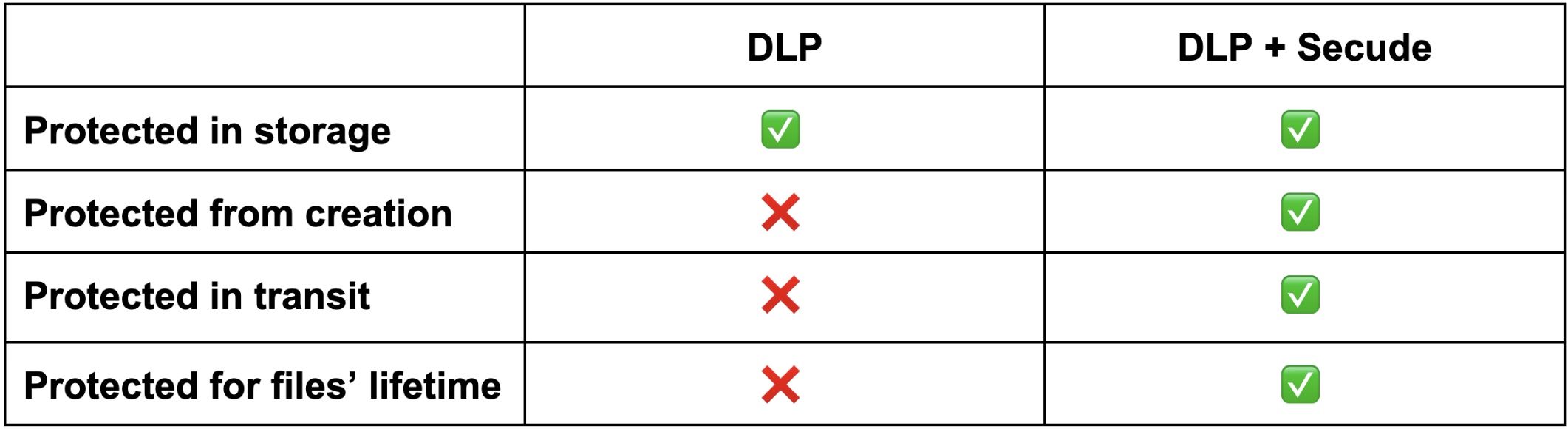
DLP tools only protect data after storage, leaving significant IP protection gaps when data is first created or in transit outside of your cloud storage/PLM system. But with Secude working alongside your existing DLP tools, you can easily close your CAD file security gaps and protect your IP. Here’s how.
In manufacturing, CAD files containing your most valuable trade secrets are your ‘crown jewels’. DLP security acts like a bank vault, locking down these jewels and protecting them from internal and external threats. But DLP security does not protect these jewels when they’re first created or when they’re travelling to and from the bank vault.
With DLP, your priceless CAD files are:
Secude’s file-level security works with your existing DLP set-up to close these CAD file security gaps.
With Secude & DLP, your CAD files are:
DLP + Secude = ultimate CAD file protection
IP leakage can be detrimental to your company’s future prospects, harming your reputation, exposing your secrets, and undermining your productive competitiveness.
With your DLP tools & Secude working together, your CAD files are always protected from external attacks and insider negligence (55% of insider security incidents resulted from employee negligence) as unauthorized personnel cannot access your CAD files even if they get hold of them.
Over a third of data breaches in 2025 involved third-parties. By targeting less-security focused supply chain partners, cyber attackers can infiltrate your cloud-based PLM or gain unauthorized access to CAD files directly.
With Secude working alongside your existing DLP tools, your CAD files have lifetime sensitive labels that prevent unauthorized access even if there is a data breach. You can also monitor usage and revoke third-party access at any time (i.e. after an NDA expires or project finishes).
While some DLP systems can recognize CAD file extensions, they impose “all or nothing” encryption rules on these files, which keeps them secure, but hinders collaboration with third parties.
With Secude working alongside DLP, you can secure your CAD files with encryption (using HaloCAD) or without encryption (using HaloSHARE). For example, if you want to share factory blueprints with a third-party production partner, HaloSHARE can add visible watermarking of the document ownership. Additionally, discreet marking (metadata) will be implanted within the files (enabling traceability of file leaks back to the partner who the file is shared with) and the file is then digitally signed to prevent modifications.
Example: Microsoft Purview Information Protection (MPIP)
MPIP helps manufacturing companies using Microsoft 365 to protect and manage data across different environments, but its sensitivity labels only encrypt and track native MS Office files. Secude’s HaloCAD extends MPIP protection to all major CAD file formats (i.e. Autodesk, Siemens, PTC, and Dassault Systemes etc), embedding lifelong encryption and data governance into CAD files from creation.
Secude and DLP tools serve different parts of the security journey. DLP tools keep your CAD files secure after data is stored. Secude keeps your CAD files secure before data is stored and when data travels.
Together, they protect your CAD files (and the IP contained within them) for its lifetime.
For more information, download our white paper: CAD file security: How Manufacturers can protect IP in 2026.
.png)
.png)
.png)
.png)